Garage doors change the look of the whole property — but the customer is choosing from a brochure
The garage door is one of the largest single-coloured features on most front elevations. A new one shifts the look of the whole house. But the customer is comparing brochure samples, all photographed against a perfect white render with sharp daylight.
Their actual house is red brick. Or pebble-dash. Or has a bay window that isn’t in the brochure. Translating “anthracite sectional, ribbed” from a 100mm sample to their entire property is hard — which is why customers default to whatever they had before.
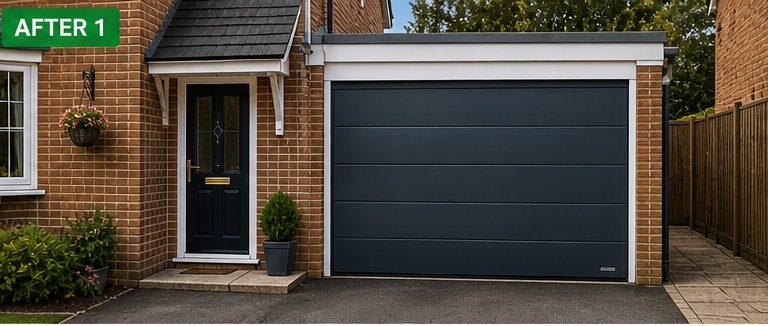
An AI mock-up uses the customer’s own property photo with the proposed garage door fitted. It doesn’t replace a measured survey, but it lets the customer see how anthracite sectional looks against their actual brickwork before agreeing the spec.
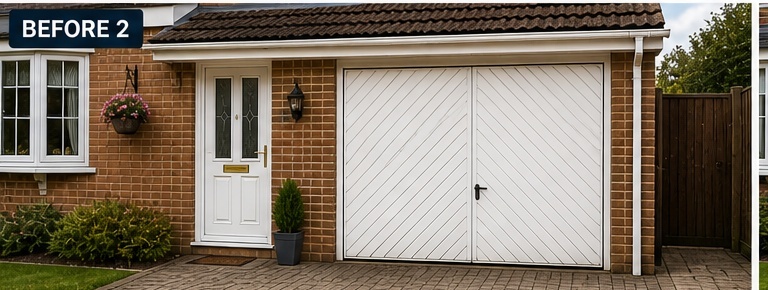
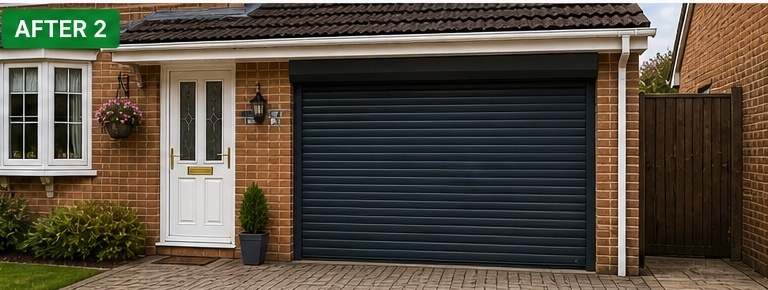
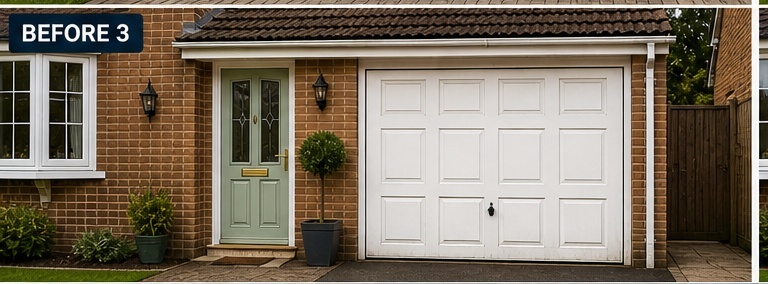
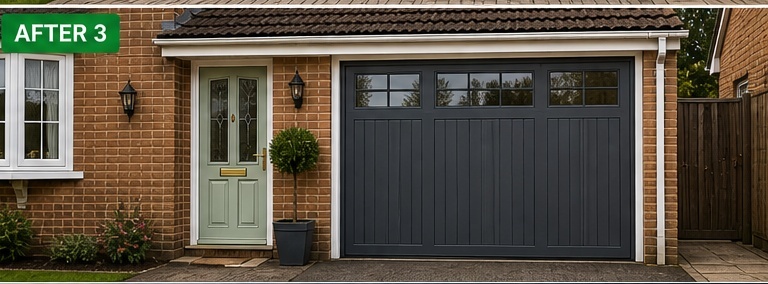
Three example garage door mock-ups built from a property photo
Each visual is generated from one before photo. The replacement quote sits inside the same PDF, so door, motor, finish and price are reviewed together.
These are illustrative AI sales mock-ups, not measured surveys, structural calcs or installation drawings. Always confirm aperture dimensions, lintel position, drive-through height and any structural opening-up requirements before order.
Example 1 — white up-and-over to anthracite sectional
Show a white up-and-over door replaced with an anthracite sectional. Useful when the customer is unsure whether dark colours will work against their existing brickwork.
*Illustrative AI visual quote example
Try yourself — create your own mock-up in 60 secondsAdd an image and get a design back. No registration needed.
Example 2 — side-hinged door to anthracite roller shutter
Help customers compare older side-hinged doors with a modern anthracite roller shutter option. Strong when drive-through space is tight and the customer needs the headroom of a roller.
*Illustrative AI visual quote example
Example 3 — white panelled to anthracite carriage style
Use visuals to show how colour and door style change the look of the property frontage. Good for upselling premium carriage-style designs against a budget panelled option.
*Illustrative AI visual quote example
Free demo · no signup needed
Try the AI mockup yourself before you sign up
Upload a property photo on our free demo page, write a short brief, and see your own AI before-and-after in about a minute. No card details, no email confirmation, nothing to install. It’s the same engine that powers the visual quotes above.
Why visual quotes help garage door installers upsell premium colours and finishes
Most garage door customers settle for the “safe” option (white sectional, standard motor) because they can’t picture the alternatives on their own house. The premium spec — anthracite, woodgrain, side door, smart hub — loses out by default.
A visual quote takes the imagination out of it. Show the customer their actual house with anthracite vs woodgrain vs ribbed-sectional, and the upgrade conversation becomes “which one suits the brick best?” instead of “is it worth the extra?”
It also speeds up the second-quote cycle. Garage doors are a comparison purchase — most customers get three quotes. The one with the visual usually wins.
How TailoredQuote works for a garage door installer
Add the door details
Type or speak rough notes — existing door type, replacement style (sectional, roller, up-and-over), colour, motor, hardware, control hub.
Upload the customer’s property photo
A standard mobile photo of the front of the house, showing the existing garage door head-on. Daylight = cleaner mock-up.
Generate the door mock-up
The AI produces a visual showing the proposed door fitted. Up to 3 amendments to compare colours, ribbing or panel detail.
Send the quote for approval
Branded PDF with the visual built in, plus an online accept-and-sign button. Clearer record before ordering the door.
Online quote acceptance
Once they can see the new door, make it easy for them to say yes
The visual sells the upgrade. The acceptance step closes it. TailoredQuote keeps the quote, the door mock-up and the customer’s approval together in one record — clearer than verbal yes-or-no over the phone.
Designed to support standard UK trade quote acceptance under the Electronic Communications Act 2000. Not intended for deeds, wills, land transfers or other documents requiring witnessed or notarised execution.
1
Customer opens your quote on phone or laptop
Branded PDF plus an online review page they can scroll through.
2
They review the door mock-up and the scope
Door, finish, motor, hardware and price all in one view.
3
They sign on screen with their finger or mouse
You get an emailed PDF showing what was accepted, when and by whom.
What’s built in for garage door work
Six things that matter for a typical garage door quote, included as standard.
🚗
Show roller, sectional and up-and-over
Three completely different door types on the customer’s actual property — not stacked brochure photos.
🎨
Compare colours on the actual house
Anthracite, jet black, agate grey, woodgrain — visualised against the customer’s real brickwork or render.
📱
Add automation and hardware notes
Motor type, remote handsets, smart-home hub, side door, glazing — AI drafts the wording, you check every line and price.
📄
Visuals built into the quote PDF
The mock-up sits inside your branded quote, so the door choice and the price are reviewed together.
✅
Online approval before order
Online accept-and-sign gives a clearer record of door spec, colour and motor before the order goes in.
💰
Easier to upsell premium spec
When the customer can see anthracite woodgrain on their house alongside white sectional, the premium becomes a real choice.
The maths is straightforward
If a visual quote helps you secure one extra garage door installation — or upgrade a customer to premium spec on a job they’d have done anyway — TailoredQuote pays for itself many times over.
Garage door jobs typically run from a few hundred to a few thousand. The software is a small fixed monthly cost.
Plans from £35/month with a 14-day free trial. No card needed to start. See pricing.
Common exclusions to put on every garage door quote
Replacement garage doors surface unexpected work the moment the existing frame comes out — rotten timbers, wonky lintels, brickwork repair. Listing these on every quote means the awkward conversation happens at quote stage.
Removal and disposal of existing garage door, frame and hardware
Asbestos discovery in old garage door panels, fixings or surrounds
Building Regulations notification for structural alterations
Floor levelling, threshold concrete repair or new threshold beam
Electrical isolation, new wiring or motor connection (Part P notification)
Make-good of plastering, brickwork or render around the new frame
Painting, decoration or render finishing of the surround
Smart-home integration beyond the standard handset and hub
Glazing within the door (priced from chosen sample)
Bespoke colour matching to a non-standard RAL code (priced from sample)
Insulation, weather-sealing or anti-trap upgrades beyond standard
CCTV, smart camera or proximity sensor integration
Removal of attached canopies, porch features or alarm sensors
Repair of damaged garage roof, overhead beams or supports
Out-of-area travel, restricted parking or limited access surcharges
Edit this list to fit your typical jobs. The point is to set expectations early, not to copy ours word-for-word.
Frequently asked questions
Can I show roller and sectional options on the same property?
Yes. From one customer photo you can generate the initial mock-up plus up to three amendments. Useful for comparing roller, sectional and up-and-over — or different colours of the same door type — on the same house.
Can I compare different colours?
Yes. Run colour variations on the same photo — anthracite vs jet black vs agate grey, or smooth vs woodgrain finish. The customer compares them on their actual house and picks the one that suits the brick.
Can customers sign before I order the door?
Yes. The branded quote PDF and the door mock-up are in the same record, with an accept-and-sign button on the review page. You get an emailed PDF showing what door, colour and price were accepted, when and by whom — clearer than a verbal yes before the order goes in.
Are the door visuals exact?
No — treat them as illustrative AI sales mock-ups. Real door colour, panel ribbing detail and proportions vary by manufacturer. Always confirm the chosen door spec against the manufacturer’s sample or showroom example before order.
Can I include automation and motor options?
Yes. The quote can include the motor, remote handsets, smart hub, photocells and any optional smart-home integration as separately-priced line items. The customer sees the door visual and the spec on the same PDF.
Will I still control the price, or does the AI guess that?
You set every price. The AI drafts the scope wording (remove existing, fit new frame, install door, motor, controls, second-fix) but you review and edit every line and price before the quote goes out.
Also relevant: if you also fit windows, front doors or composite doors alongside garage door work, see our Window Fitters page or the new Window & Door Visual Quotes page.
Ready to send your first garage door quote with a visual mock-up?
14-day free trial. No card needed to start. Cancel any time.